
Upload your drawings
Upload existing drawings in PDF, image, or DWG formats. DrawX automatically organizes their information and relationships.
Try DrawX free for 7 days
Request a Free Trial →Upload existing drawings in PDF, image, or DWG formats. DrawX automatically organizes their information and relationships.
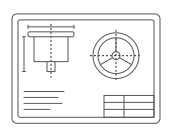
Automatically extract the information you need, including dimensions, materials, and BOM data, and convert 2D drawings to 3D to easily understand complex shapes.
Search by attributes and shape without a drawing number. Find similar drawings, quotes, suppliers, and quality records.
DrawX auto-aligns and compares drawings across sizes and layouts, showing only what was changed.

BeforeRely on memory for filenames and drawing numbers

DrawXFind the right drawings by attributes and shape

BeforeOverlay drawings and find changes manually

DrawXAuto-detect additions, deletions, and edits
BeforeAsk the design team to explain complex shapes
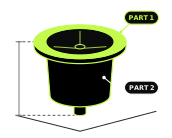
DrawXConvert 2D drawings to 3D and see for yourself

BeforeSearch past drawings and quote records separately

DrawXUse similar drawings and related records together

BeforeRely on each person's standards and experience

DrawXConvert company-specific fields and similarity rules into data
Frequently asked questions
If you use mechanical drawings for design, purchasing, or management at work, you can request a trial. We'll review your request before issuing a trial account.
After a brief review, we'll issue trial accounts on a rolling basis starting November 9.
You can use DrawX for 7 days after your account is issued.
You can try Drive to upload drawings and let AI interpret and structure their data, Search to find the drawings you need, and Compare to check changes between drawings.
DrawX supports drawings in PDF, image, DWG, and TIFF formats.
You can upload up to 100 drawings during your DrawX trial.
Yes. You can try DrawX with your own drawings or with the sample data we provide.
If you'd like to implement DrawX after the trial, contact our team. We can discuss the standard features as well as additions tailored to your drawing workflows.
We analyze uploaded drawings only to provide trial features. We do not use them to train AI models.
Request your trial now. Accounts will be issued shortly.
Thank you for your interest in DrawX. A member of our team will be in touch shortly.
